What Is DAST? The Complete Dynamic Application Security Testing Guide for 2026
A complete guide to DAST in 2026: how dynamic testing works, passive and active scans, crawling and authentication, what it finds and misses, and how to turn a scanner alert into proof.

Beyond ASPM
Proof-Driven AppSec for teams building with AI
Plexicus uses AI Swarm Pentest to explore authorized application paths, validate what is exploitable, and give teams evidence they can use to prioritize remediation.
Explore AI Swarm PentestYour code can look correct and still behave badly once it runs.
A header is missing. An error page prints a database table name. A login form accepts a payload it should reject.
None of that is visible in a source file. All of it is visible to anyone who sends the right request.
DAST, dynamic application security testing, tests a running application from the outside: it sends requests, watches the responses and reports behavior that points to a vulnerability, without needing the source code.
OWASP’s DevSecOps Guideline calls DAST black-box testing that finds weaknesses in a running application by injecting malicious payloads, for attacks such as SQL injection or cross-site scripting. OWASP
That is also how attackers start. They do not read your repository. They send requests to what you deployed.
That matters in 2026. Verizon’s 2026 Data Breach Investigations Report says 31% of breaches now start with software vulnerabilities, beating stolen passwords as the top way attackers get in.
This guide explains what DAST is, how a scan works, what it finds and what it misses, how to run it in a pipeline, and how to turn a scanner alert into evidence your team can act on.
What Is DAST?
Dynamic application security testing (DAST) is a testing method that exercises a deployed, running application through its interfaces, such as web pages and APIs, and looks for security weaknesses in how it responds.
“Dynamic” means the application is executed. The tester does not model the code; it watches the real program react.
“Black-box” means the tool starts with no view inside. It sees what any client sees: URLs, forms, parameters, headers, cookies and responses.
OWASP’s community page on these tools puts it in similar terms: web application vulnerability scanners are automated tools that test applications, usually from the outside, for weaknesses such as cross-site scripting, SQL injection, command injection, path traversal and insecure server configuration, and they are often called DAST tools. OWASP
A typical DAST finding answers four questions:
- Where: the URL, the HTTP method and the parameter that was tested.
- What was sent: the request, often with the test payload in it.
- What came back: the response, or the part of it that gave the problem away.
- What kind of weakness it suggests, often mapped to a CWE identifier.
Notice what is missing: the file and the line. A DAST tool reports behavior, not code.
What can a DAST tool test?
- Web applications: server-rendered sites and single-page applications in a browser.
- APIs: REST endpoints described by OpenAPI, plus SOAP and GraphQL in tools that support them.
- The deployment around the code: TLS, security headers, cookie flags, error pages and server banners.
Is DAST the same as a vulnerability scanner?
Almost. “Vulnerability scanner” is a broad term that also covers network and host scanners, which check open ports and installed software versions.
DAST is the application-level part: it tests the logic and responses of your own web application and API, not only what software the server runs.
Why DAST Matters in 2026
DAST has existed for more than two decades. Four facts make it more useful now, not less.
1. Exploited vulnerabilities are the top way in
The 2026 DBIR executive summary says exploitation of vulnerabilities is now the most common initial access vector for breaches, at 31%, while credential abuse, the previous leader, fell to 13%. The incidents in that edition took place between November 1, 2024 and October 31, 2025. Verizon DBIR
Not every exploited vulnerability sits in your own application code.
But an attacker reaches your application the same way a DAST tool does: through the requests it accepts.
2. The top risks are runtime risks
The OWASP Top 10
ranks Broken Access Control first and Security Misconfiguration second. Injection is fifth, Authentication Failures seventh, and Mishandling of Exceptional Conditions tenth.Configuration, authentication and error handling are properties of the running system. A source file often cannot show them; a request can.
3. Most new surface is an API
The OWASP API Security Top 10 2023 puts Broken Object Level Authorization first, Broken Authentication second and Server Side Request Forgery seventh.
It also lists Improper Inventory Management as API9. Teams cannot test an endpoint they do not know exists, and a scan that only follows the API definition will miss endpoints the definition does not list. Comparing what a crawler or traffic capture observes with what the definition declares is one way to find them.
4. Minimum standards ask for it
NIST’s Guidelines on Minimum Standards for Developer Verification of Software (NISTIR 8397), published in October 2021, says that if the software provides a web service, developers should use a DAST tool, such as a web application scanner, or an IAST tool to detect vulnerabilities.
NIST calls these minimum standards: techniques developers should already be using, not a list of best practices.
DAST vs. SAST
SAST and DAST look at the same application from opposite sides.
NISTIR 8397 draws the line this way: apart from hybrids, analysis divides into code-based or static analysis, such as SAST, and execution-based or dynamic analysis, such as DAST. NIST
| DAST | SAST | |
|---|---|---|
| View | Outside: sends requests to a running application | Inside: reads the code |
| Needs | A deployed, running application | Source code, bytecode or binaries |
| When | After the application is built and deployed to a test environment | From the first commit |
| Reports | URL, request, response and observed behavior | File, line and code path |
| Strong at | Configuration, headers, authentication behavior, server responses | Injection patterns, unsafe APIs, data-flow problems |
| Weak at | Pinpointing the vulnerable line, pages the crawler never reaches | Runtime context, configuration, proving exploitability |
| Language | Independent of the language the application is written in | Needs support for each language and framework |
SAST tells you where a weakness might be in the code. DAST tells you what the running application actually does when someone pushes on it.
You need both. Our guide What Is SAST? covers the static side in depth, and SAST vs. DAST: the difference and why to use both compares them side by side.
DAST vs. IAST
Interactive application security testing (IAST) sits between the two.
In OWASP’s description, an IAST tool tests the application while something exercises it: an automated test suite, a human tester or ordinary use. It relies on sensors, libraries added to the application, that watch its behavior during those tests. OWASP
| DAST | IAST | |
|---|---|---|
| Access | None: the tool is a client | An agent or sensor inside the running application |
| Setup | A URL, credentials and a scope | Instrumentation per language and runtime |
| Sees | Requests and responses | Requests plus what happens inside the code |
| Good for | Any deployed web application or API | Applications the team owns and can instrument |
NISTIR 8397 notes the difference in one line: a web app scanner monitors for general unusual behavior, while a hybrid or IAST tool may also monitor program execution for internal faults. NIST
DAST vs. Penetration Testing
A DAST scan and a penetration test both attack a running system. They are not the same activity.
NISTIR 8397 uses the standard definition of penetration testing: assessors, usually working under agreed constraints, “attempt to circumvent or defeat the security features” of a system. It describes it as humans using tools, technologies and their own expertise to simulate attackers. NIST
| DAST | Penetration test | |
|---|---|---|
| Driven by | Rules and payload lists | Hypotheses about how the system can be abused |
| Goal | Flag responses that look like a known weakness | Show what an attacker can actually reach |
| Chains steps | Rarely, in classic rule-based scanners | Yes: one weakness leads to the next |
| Business logic | Mostly blind, in classic rule-based scanners | Main focus |
| Frequency | Every build or every night | Periodic, or per release |
| Output | A list of alerts | Findings with evidence and impact |
The documentation of ZAP, the open-source scanner OWASP lists as an example DAST tool, is direct about this: its active scanner cannot find logical flaws such as broken access control, and it recommends manual penetration testing alongside it. ZAP
DAST covers the known patterns at scale. A penetration test covers the paths that need judgment.
How DAST Works
Every DAST tool is different, but most scans follow the same six stages.
Scope      -> which hosts, paths and accounts are allowed
Crawl      -> discover pages, forms, parameters and API endpoints
Observe    -> passively check every request and response
Attack     -> send test payloads to each input
Analyze    -> decide which responses indicate a weakness
Report     -> URL, request, response, weakness type, severity
1. Define the scope
The first input is a target: one or more base URLs, an API definition, and the rules for what the scanner may and may not touch.
Scope is a safety control, not paperwork. ZAP’s getting-started guide warns that you should only attack an application you have permission to test, because an active scan simulates a real attack and can do actual damage to a site’s functionality and data. ZAP
So a good scope names the environment, excludes destructive paths such as “delete account” or payment endpoints, and sets a rate limit.
2. Crawl the application
The scanner has to find the attack surface before it can test it.
A traditional spider starts from seed URLs, fetches each page, extracts the links and repeats until it finds nothing new. ZAP
That works for server-rendered pages. It struggles with modern front ends. ZAP’s guide says its traditional spider is fast but not always effective on applications that make heavy use of JavaScript, and recommends its Client spider, which drives real browsers, for modern applications. ZAP
For APIs, crawling is replaced by an import. ZAP’s API scan is tuned for APIs defined by OpenAPI, SOAP or GraphQL: it imports the definition and then runs an active scan against the URLs it finds. ZAP
3. Observe passively
While it crawls, the scanner inspects every request and response it sees.
Passive checks look for problems that are visible without sending anything unusual: missing security headers, cookies without the Secure or HttpOnly flags, verbose error messages, server version banners, mixed content.
ZAP’s guide says passive scanning does not change responses in any way and is considered safe. It presents it as a way to get a feel for the basic security state of an application and to locate where more investigation is warranted. ZAP
4. Attack actively
Active scanning is where DAST earns its name.
For each input it found, the scanner sends variations designed to trigger a specific weakness: a quote character for SQL injection, a script tag for cross-site scripting, a path such as ../../etc/passwd for path traversal, an internal address for server-side request forgery.
NISTIR 8397 describes the mechanics: web app scanners create inputs as they run and monitor for unusual behavior; when an input causes a detectable anomaly, the tool uses variations of that input to probe further. NIST
Here is a simplified example of a reflected cross-site scripting probe against a test host:
GET /search?q=plx%3Cscript%3Ealert(1)%3C%2Fscript%3E HTTP/2
Host: app.example.test

HTTP/2 200
content-type: text/html

<p>Results for plx<script>alert(1)</script></p>
The payload came back in the HTML without encoding. The scanner reports a likely reflected XSS (CWE-79) on the q parameter of /search.
The fix is in the code that writes the response: encode output for the HTML context, and validate the input. The scanner cannot tell you which line that is.
5. Analyze the responses
Each response is compared against what the rule expects.
Some signals are direct, such as a reflected payload. Others are indirect: a database error message, a different response time, a change in status code, or what NIST calls subtle hints of problems, such as an internal table name in an error message. NIST
6. Report
The scanner groups its alerts by weakness type and severity, with the request and response that triggered each one.
This is where triage begins. An alert is the tool’s interpretation of a response, and someone still has to decide whether it is real, reachable and important.
Passive vs. Active DAST
The two scan modes have different risks and belong in different places.
| Passive scan | Active scan | |
|---|---|---|
| What it sends | Normal requests only | Attack payloads to every input |
| Risk to the target | Low | Real: it is an attack |
| Finds | Headers, cookies, banners, error leaks | Injection, traversal, SSRF and similar |
| Speed | Minutes | Minutes to hours |
| Where to run it | Every pipeline, even production | Test or staging environments you own |
ZAP’s baseline scan shows how a passive check fits a pipeline. By default it runs the spider against the target for one minute, waits for the passive scan to finish and reports the results. It performs no attacks and is intended to run in a CI/CD environment, even against production sites. ZAP
Run passive checks everywhere. Run active scans only where you have permission and a copy of the data you can afford to break.
Authenticated vs. Unauthenticated Scanning
Most of an application’s value sits behind a login. So does most of its risk.
ZAP’s guide lists this among the limitations of its automated scan: during a passive scan, pages protected by a login are not discoverable unless the tool’s authentication functionality has been configured. ZAP
An unauthenticated scan tests what an anonymous visitor can reach: the login page, the public pages, the password reset flow. That is useful and incomplete.
An authenticated scan logs in first and keeps the session alive. It then tests what a signed-in user can reach.
Three practical rules:
- Use dedicated test accounts, one per role, never a real user’s credentials.
- Tell the scanner how to detect a logout, so it can log in again instead of scanning the login page for an hour.
- Exclude actions that change state you care about: deleting the account, changing the password, sending email to real addresses.
Two accounts with different roles make one more check possible: can user A see user B’s data? That is Broken Object Level Authorization, the first entry of the OWASP API Security Top 10 2023. Most scanners still need help to test it, because they do not know which object belongs to whom.
Types of DAST Testing
DAST is a family of techniques. Among the main DAST tools, OWASP’s DevSecOps Guideline names three kinds: dynamic security scanners, fuzzers and attack proxies. OWASP
Automated web application scanners
The classic DAST tool: crawl, passive checks, active attacks, report.
Strengths: repeatable, fast to start, independent of the language the application is written in.
Limitations: coverage depends on the crawl; weak on business logic and multi-step flows.
API scanners
They start from an API definition instead of a crawl and send requests to each operation.
Strengths: they reach endpoints a browser never calls; the definition tells them every parameter and type.
Limitations: they only test what the definition describes, and an outdated definition means untested endpoints.
Fuzzers
A fuzzer sends very large numbers of unexpected or malformed inputs and watches for crashes, errors or anomalies.
NISTIR 8397 notes that fuzzers create huge numbers of inputs and can be programmed with inputs that often reveal bugs, such as very long or empty inputs and special characters. It adds that web app scanners often include fuzzers. NIST
Strengths: finds input-handling bugs nobody wrote a rule for.
Limitations: noisy; a crash or an error still needs a person to judge its impact.
Attack proxies
An intercepting proxy sits between a tester’s browser and the application, records every request and lets the tester change and replay them.
Strengths: combines automation with human judgment; the proxy can run passive and active checks on the traffic it sees.
Limitations: only as good as the person driving it, and hard to run on every build.
What DAST Finds Well
DAST is strongest on weaknesses that show up in the response to a request.
| Weakness | CWE | Why DAST sees it |
|---|---|---|
| Cross-site scripting | CWE-79 | the payload comes back in the page without encoding |
| SQL injection | CWE-89 | database errors, changed results or timing differences |
| Cross-site request forgery | CWE-352 | state-changing requests accepted without an anti-forgery token |
| Path traversal | CWE-22 | a file outside the web root is returned |
| OS command injection | CWE-78 | command output or timing differences in the response |
| Server-side request forgery | CWE-918 | the server fetches a URL the tester supplied |
| Security misconfiguration | varies by issue | missing headers, verbose errors, default pages, weak TLS |
Cross-site scripting, SQL injection and cross-site request forgery are ranked first, second and third in the 2025 CWE Top 25 Most Dangerous Software Weaknesses published by the CWE program at MITRE.
OWASP’s DevSecOps Guideline adds three areas where DAST tools are especially helpful: input and output validation, authentication issues and server configuration mistakes. OWASP
DAST also has one advantage over code analysis: it tests the deployed system as a whole. The framework, the libraries, the web server, the proxy in front and the configuration all take part in every response it reads.
What DAST Misses
The limits are as important as the strengths. Four follow directly from how a scan works.
1. Anything the crawler does not reach
A page the spider never finds is a page that is never tested. Hidden admin routes, flows that need valid data to continue, and features behind a feature flag all fall into this gap.
ZAP’s guide gives a simple example: spiders enter basic default data into forms, so a registration form that needs a valid email address may reject the input and hide everything behind it. ZAP
2. Business logic and access control
A scanner does not know that a customer should only see their own invoices, or that a discount should apply once.
ZAP’s documentation, cited above, says its active scanner will not find logical flaws such as broken access control. ZAP Some tools add dedicated access-control tests, but they need to be told which user may see what. Broken Access Control is the first category of the OWASP Top 10
.3. The location of the bug
DAST reports a URL and a parameter. A developer still has to find the code that produced the response, which slows the fix.
4. Weaknesses with no visible effect
Some problems never show up in a response. NISTIR 8397 notes that dynamic testing is unlikely to uncover hardcoded passwords and private keys in code, which is why it recommends heuristic tools for that review. NIST
DAST answers “does the running application behave badly when pushed?”. It does not answer “where is the bug?” or “what is everything an attacker could chain together?”.
DAST False Positives and False Negatives
NISTIR 8397 says one advantage of dynamic testing is that it has few, if any, false positives. NIST That is true of the core idea: if the program really crashed on an input, the crash happened.
Scanners are less tidy than the idea. In practice an alert can still be wrong, for three common reasons:
- Heuristic matches: a response that contains an error-like string, or that is slower once, is read as a sign of injection.
- Reflection without execution: a payload comes back in the response, but in a context where it cannot run, such as a JSON value served with the right content type.
- Environment noise: a web application firewall, a rate limiter or a shared staging database changes responses between requests.
False negatives are the bigger risk. A clean DAST report can mean the application is fine, or that the scanner never logged in, never reached the API, or gave up on a JavaScript front end.
The OWASP Benchmark helps measure both. It is a runnable Java and Python test application that any testing tool can analyze, including SAST, DAST (such as ZAP) and IAST, and its intent is that every vulnerability it scores is actually exploitable.
Benchmarks are synthetic. The test that matters is your own application: scan it, then have an engineer triage a sample of alerts and count how many led to a real fix.
Where DAST Fits in the SDLC
DAST needs something running, so it starts later than SAST. It does not have to wait for production.
NIST’s Secure Software Development Framework (SP 800-218) has a practice to test executable code to identify vulnerabilities, PW.8. Its task PW.8.2 asks teams to scope the testing, design the tests, perform them and document the results, including recording and triaging all discovered issues and recommended remediations in the team’s workflow or issue tracker.
The implementation examples for that task include integrating dynamic vulnerability testing into the project’s automated test suite, adding tests for previously reported vulnerabilities so they are not reintroduced, using fuzz testing tools, and, where resources allow, using penetration testing to simulate how an attacker might compromise the software in high-risk scenarios. NIST SP 800-218
A common layout:
Pull request    -> passive scan of a preview deployment
Merge to main   -> authenticated active scan of staging
Nightly         -> full crawl, full API definition, all rules
Before release  -> penetration test of high-risk changes
Production      -> passive checks only, with agreed limits
OWASP’s DevSecOps Guideline notes that DAST tools usually need little user interaction once configured and can run as part of a nightly scan. OWASP
How to Evaluate a DAST Tool
Each item on this checklist comes from a limit described above.
- Crawling of modern front ends. Can it drive a real browser through a single-page application?
- Authentication. Can it log in with your real flow, including multi-step and token-based logins, and stay logged in?
- API support. Can it import OpenAPI, and GraphQL or SOAP if you use them?
- Scope and safety controls. Exclusions, rate limits, a safe mode, and a way to tag its traffic.
- Evidence per alert. The full request and response, and a way to replay it.
- CI/CD integration. A command-line or container mode, configurable pass and fail rules, machine-readable output.
- Accuracy on known ground truth. Results on the OWASP Benchmark or on a test application you know well.
- Triage support. Deduplication, suppression with a reason, and export to your issue tracker.
DAST Best Practices
1. Test a production-like environment
The value of DAST is that it tests the deployed system. A staging environment with different headers, a different proxy or a different login than production tests a different system.
2. Scan as every role you have
One test account per role, plus an anonymous run. Compare what each can reach.
3. Feed the scanner your API definitions
Do not rely on the crawler to find API endpoints. Import the OpenAPI or GraphQL schema, and keep it up to date as part of the release.
4. Start passive, then add active rules
Put a passive scan on every pull request first. Add active scanning on staging once the team trusts the results.
5. Exclude destructive actions explicitly
Deleting data, sending email, charging cards and resetting passwords do not belong in an automated active scan. Write the exclusions down and review them with each release.
6. Record and triage in the developer’s workflow
That is what NIST asks for in PW.8.2. An alert should land in the issue tracker of the team that owns the endpoint, with the request and response attached.
7. Turn every confirmed finding into a regression test
PW.8.2 also suggests incorporating tests for previously reported vulnerabilities into the test suite. A confirmed injection should stay fixed.
8. Validate before you escalate, re-test after the fix
Before a scanner alert becomes a critical ticket, reproduce it. After the fix merges, run the same request again and confirm it no longer works.
Common DAST Mistakes
Mistake 1: Scanning without logging in
The report looks clean because the scanner tested the login page and little else.
Mistake 2: Running active scans against production by default
An active scan is an attack. ZAP’s own guidance limits it to targets you have permission to test.
Mistake 3: Treating the alert count as the metric
More alerts is not more security. Count confirmed, fixed issues and the time it took to fix them.
Mistake 4: Assuming a clean scan covers access control
ZAP’s documentation says its active scanner will not find broken access control. A clean DAST report says little about it unless someone tested it with accounts and ownership rules.
DAST for APIs
APIs change the shape of the problem.
There is often no page to crawl, so the scanner needs the definition. The responses are JSON, so classic browser-only checks such as cross-site scripting matter less: ZAP’s API scan notes that its active scan, tuned to APIs, does not look for XSS. ZAP
What matters more is in the OWASP API Security Top 10 2023:
- API1, Broken Object Level Authorization: changing an ID in the path returns someone else’s record.
- API2, Broken Authentication: tokens that never expire, weak reset flows.
- API5, Broken Function Level Authorization: a regular user can call an admin operation.
- API7, Server Side Request Forgery: the API fetches a URL the caller supplies.
- API8, Security Misconfiguration: verbose errors, permissive CORS, missing transport security.
Two of those five are authorization problems, and a third is authentication. Testing them needs two accounts and a model of who owns what, which is closer to a penetration test than to a classic scan.
Standards and Frameworks That Call for Dynamic Testing
NISTIR 8397
NIST’s minimum standards for developer verification of software, published in October 2021. It recommends a DAST or IAST tool when the software provides a web service, and a fuzzer for automatic active testing. NIST
NIST SSDF (SP 800-218)
The current final edition was published in February 2022. Practice PW.8 covers testing executable code; task PW.8.2 asks for the results to be recorded and triaged. NIST
NIST published a draft revision, SP 800-218 Rev. 1, on December 17, 2025; its comment period closed on January 30, 2026, and it remains a draft, so practice and task numbers may change in the final text. NIST
OWASP Web Security Testing Guide
The WSTG is OWASP’s reference for testing web applications. It has a stable web-hosted release, and its next major release is in development. OWASP WSTG
Its testing chapters run from information gathering and configuration testing through authentication, authorization, session management, input validation, error handling, weak cryptography, business logic, client-side and API testing. OWASP WSTG A scanner automates part of that list; the business logic chapter is the clearest example of what it does not.
OWASP ASVS
The Application Security Verification Standard, whose latest stable version is 5.0.0, lists detailed verification requirements. Some can be checked with a dynamic test; others need code review or a human tester. OWASP ASVS
From DAST Alert to Proof
Here is the honest summary of DAST.
It is the cheapest way to see your application the way an outsider does, on every build.
It is also limited by design to the pages and endpoints it can reach, and, in ZAP’s own documentation, its active scanner cannot find logical flaws such as broken access control.
A scanner alert says “this response looks like SQL injection”. A proof says “we extracted these records through this request, and here is how to replay it”. The first is a hypothesis. The second is a finding.
So the question is not “DAST or something else”. It is what happens after the alert:
Scanner alert   -> "this response looks like a weakness"
Validation      -> "here is the request that proves it, and what it reaches"
Chaining        -> "this step leads to the next one, up to the data"
Reviewed fix    -> "here is the change, with the reasoning and a test"
Re-test         -> "the same request no longer works"
That chain is what we call Proof-Driven AppSec. Its rule is short: no PoC, no finding.
A dynamic alert is where the work starts. Evidence is what makes a team move.
Where Plexicus Fits
Plexicus starts where a scanner stops: it tests the running application like an attacker would, and presents as verified only what it can reproduce.
Test the running application. AI Swarm Pentest validates exploitable paths across your application, API and source code. Your team receives the evidence, the impact context and a remediation path they can review.
In the platform, each run records its target and its assessment configuration:
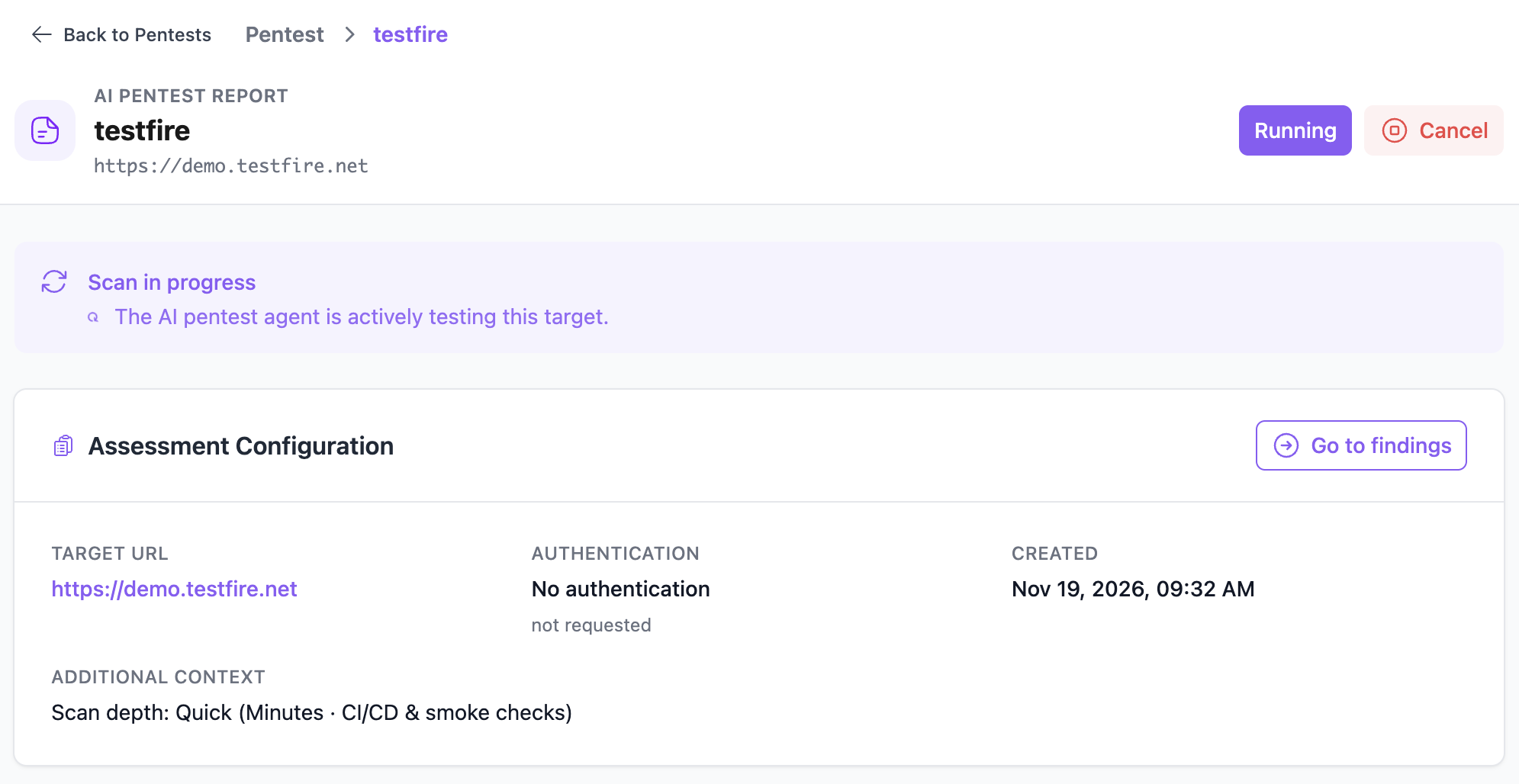
Screenshot: an AI Pentest run in progress in the Plexicus platform against a public demo target, with its assessment configuration. Captured November 2026.
The difference from a scanner is in how it works. The product page puts it directly: a scanner compares signatures, while AI Swarm Pentest forms hypotheses, explores attack paths and connects the evidence.
Stay inside the scope. Before work starts, the authorized application, API or environment, the rules of engagement and any test access are agreed in writing. Plexicus does not act outside that scope, and it makes no automatic production changes.
Verify before reporting. The engagement maps the surface, forms hypotheses and tests paths. A second pass independently confirms each finding before it is marked verified. If that second pass cannot reproduce the result, the finding is marked unverified or discarded.
See the whole path, not one alert. The deliverable includes the complete attack chain: the target, the steps, the demonstrated impact and the context your team needs. The report is prioritized by real risk, CVSS plus context, not by order of arrival.
In the platform, the Chain of proof panel of a run shows how the steps link together:
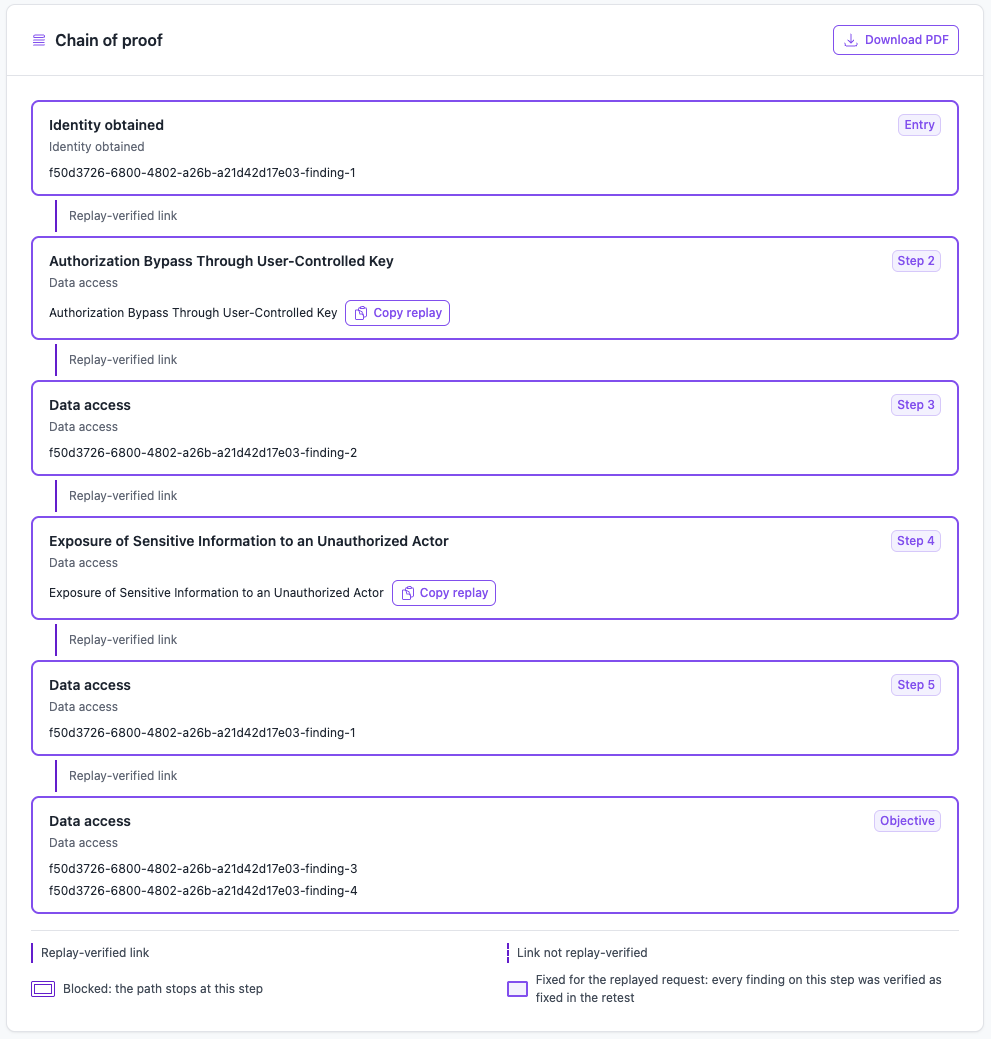
Screenshot: the Chain of proof panel of an AI Pentest run in the Plexicus platform, six linked steps from the entry point to the objective, each link marked replay-verified. Lab target, captured November 2026.
That is the step a classic scanner report usually leaves to you. An authorization bypass on its own is an alert; the same bypass linked to the data it exposes is a finding a team can prioritize. Our introduction to AI Swarm Pentest explains how the swarm of agents works.
Fix it. Once a finding is verified, Plexicus Remediation prepares the remediation context and a suggested change. For classic SAST findings such as SQL injection, XSS, SSRF, insecure deserialization and weak cryptography, Plexicus prepares reviewed patches for the OWASP Top 10 with regression tests attached, and a re-test hook is wired to CI. Your team keeps merge control: Plexicus never pushes to production.
Add the code view. Deep Code Analysis traces the affected code path, so engineers see the endpoints, parameters and business logic a finding touches. The product page describes the pairing: Deep Code Analysis adds the relevant context, and AI Swarm Pentest validates the highest-priority findings.
Put together, that is a closed loop with PR: a tested path, evidence, a reviewed change your team decides to merge, and a re-test.
To see where DAST sits in a full program, read our complete guide to application security. For what happens after validation, see Introducing AI-Native Remediation.
Frequently Asked Questions
What does DAST stand for?
DAST stands for dynamic application security testing: testing a running application from the outside for security weaknesses, without access to its source code.
What is the difference between DAST and SAST?
SAST reads the code without running it and points to a file and line. DAST tests the running application by sending requests and reports the URL, parameter and response. SAST starts at the first commit; DAST needs a deployed application.
What is the difference between DAST and IAST?
DAST tests from the outside with no access to the application’s internals. IAST adds sensor modules inside the running application, so it sees what happens in the code while tests interact with it.
Is DAST the same as penetration testing?
No. DAST is automated and rule-driven, and runs often. A penetration test is driven by hypotheses about how the system can be abused, chains weaknesses together and focuses on what an attacker can actually reach, including business logic.
What vulnerabilities can DAST find?
DAST is strongest on weaknesses visible in responses: cross-site scripting, SQL injection, cross-site request forgery, path traversal, command injection, server-side request forgery and security misconfiguration such as missing headers or verbose errors.
What can DAST not find?
ZAP’s documentation says its active scanner will not find logical vulnerabilities such as broken access control, so those need targeted tests with test accounts for each role. DAST also misses anything its crawler does not reach, cannot point to the vulnerable line of code, and is unlikely to find hardcoded secrets.
Can you run DAST in a CI/CD pipeline?
Yes. Passive scans are fast enough for every pull request, and some are designed to run even against production. Active scans fit better on merges to a staging environment or as a nightly job.
Is it safe to run DAST against production?
Passive scans are generally considered safe. Active scans send real attacks and can damage data or functionality, so run them only against environments you own and have permission to test, with destructive actions excluded.
Is DAST enough on its own?
No. DAST is one layer. A program also needs code analysis, dependency checks, and a way to prove which findings are exploitable before the team spends time fixing them.
Make Every Alert Prove Itself
Test what you deployed the way an attacker would, then spend your team’s time only on what can be proven.
Want a first look at your own code as well? Run the free SAST tool, a static scan of your GitHub source code.