What Is SAST? The Complete Static Application Security Testing Guide for 2026
A complete guide to SAST in 2026: how static analysis works, what it finds and what it misses, why it produces false positives, and how to turn a finding into proof.

Beyond ASPM
Proof-Driven AppSec for teams building with AI
Plexicus uses AI Swarm Pentest to explore authorized application paths, validate what is exploitable, and give teams evidence they can use to prioritize remediation.
Explore AI Swarm PentestEvery security bug in your own software starts as a line of code.
Static application security testing is one of the oldest automated ways to look for those lines before anyone runs the program.
SAST analyzes source code, bytecode or binaries without executing the application, and reports code patterns and data flows that may lead to a vulnerability, together with the file and the line where they sit.
OWASP describes these tools the same way: source code analysis tools, also known as SAST tools, analyze source code or compiled versions of code to help find security flaws. OWASP
The idea is simple. The practice is not.
A SAST tool can flag a dangerous pattern in seconds. It cannot always tell you whether an attacker can reach that pattern, what data sits behind it, or whether the alert is real.
That gap matters more in 2026. In its 2026 Data Breach Investigations Report, Verizon found that exploitation of vulnerabilities had become the most common initial access vector in the breaches it analyzed, at 31%, up from 20% the year before.
This guide explains what SAST is, how it works, what it finds and what it misses, how to evaluate a tool, and how to turn a static finding into evidence your team can act on.
What Is SAST?
Static application security testing (SAST) is a white-box testing method that inspects an application’s code, without running it, to find weaknesses that could become security vulnerabilities.
“White-box” means the tool sees the inside of the application: the source files, the functions, the variables and how data moves between them.
“Static” means nothing is executed. The tool reads and models the code the way a compiler does, then applies security rules to that model.
A typical SAST finding answers four questions:
- What weakness was found, usually mapped to a CWE identifier such as CWE-89 (SQL injection).
- Where it sits: file, line and the code snippet.
- How untrusted data reaches it, when the tool traces a data flow.
- How severe the tool believes it is.
OWASP lists that location detail as one of the method’s main strengths: SAST output highlights the problematic code by file name, location, line number and even the affected snippet. OWASP
That is why developers keep using it. A finding that points to line 276 of a file is easier to act on than a report that says “the login page is vulnerable”.
What can a SAST tool analyze?
Depending on the tool, SAST works on one or more of these inputs:
- Source code, the most common input: Java, Python, JavaScript, Go, C#, PHP and so on.
- Bytecode, such as compiled Java classes or .NET assemblies.
- Binaries, when source is not available.
- Infrastructure and configuration files, in tools that extend static analysis to Terraform, Dockerfiles or Kubernetes manifests.
Some tools need code that compiles. OWASP notes that many SAST tools have difficulty analyzing code that cannot be compiled, and that analysts often lack the right libraries, build instructions or the full code base. OWASP
Is SAST the same as static code analysis?
Almost.
Static code analysis is the broad technique: any automated reading of code without running it, including style checks, bug finders and type checkers.
SAST is static code analysis with a security goal. It uses the same compiler techniques, but its rules look for vulnerabilities, not formatting or performance.
Why SAST Matters in 2026
SAST is not new. Four developments make it more relevant now, not less.
1. Exploited vulnerabilities are the top way in
Verizon’s 2026 DBIR puts exploitation of vulnerabilities at 31% of the breaches it analyzed. Credential abuse, the previous leader, fell to 13%, partly because Verizon now counts pretexting as a separate vector. Verizon DBIR
Not every exploited vulnerability is a coding flaw in your own application: the report’s figure covers vulnerabilities in any software, including third-party products.
But the part that is in your own code is the part only your team can fix, and SAST is the first automated check that reads it.
2. The oldest bug classes are still at the top
The 2025 CWE Top 25 Most Dangerous Software Weaknesses, published by the CWE program at MITRE, ranks cross-site scripting (CWE-79) first and SQL injection (CWE-89) second.
Both are injection flaws that SAST was built to find.
In March 2024, CISA and the FBI issued a joint Secure by Design Alert on eliminating SQL injection. It notes that SQL injection is still a prevalent class of vulnerability despite two decades of documentation and effective mitigations.
3. More code is written by AI assistants
AI coding assistants write code faster than people can review it.
In its 2026 GenAI Code Security Report, published in July 2026, Veracode reported that roughly 44% of the AI code generation tasks it tested produced code with a known vulnerability. The average security pass rate across models was 56%, barely changed from 55% in its first report. These are company-reported results from a security vendor, not an independent replication.
Whatever the exact rate in your code base, more generated code means more code that someone, or something, has to check.
4. Secure development frameworks ask for code analysis
NIST’s Secure Software Development Framework (SP 800-218) includes a practice to review and/or analyze human-readable code to identify vulnerabilities, so they can be corrected before the software is released.
Task PW.7.2 asks teams to perform the code review or code analysis based on their secure coding standards, and to record and triage all discovered issues and recommended remediations in the team’s workflow or issue tracker.
SAST is a common way to meet the “code analysis” half of that task at scale.
SAST vs. DAST
SAST and DAST are the two best-known testing methods, and they look at an application from opposite sides.
| SAST | DAST | |
|---|---|---|
| View | Inside: reads the code | Outside: sends requests to a running application |
| Needs | Source code, bytecode or binaries | A deployed, running application |
| When | From the first commit | After the application is built and deployed to a test environment |
| Reports | File, line and code path | URL, request, response and observed behavior |
| Strong at | Injection patterns, unsafe APIs, data-flow problems | Runtime behavior, configuration, server responses |
| Weak at | Runtime context, configuration, proving exploitability | Pinpointing the vulnerable line, code that is never reached by the crawler |
SAST tells you where a weakness might be. DAST tells you what the running application actually does.
Neither replaces the other. For a deeper comparison, see SAST vs. DAST: the difference and why to use both.
SAST vs. SCA
Software composition analysis (SCA) looks at the code you did not write.
It inventories open-source packages and other third-party components, then matches their versions against known vulnerabilities.
SAST looks at the code you did write: your functions, your queries, your handlers.
| SAST | SCA | |
|---|---|---|
| Scope | First-party code | Third-party components and their versions |
| Finds | Coding flaws, often with no CVE | Known vulnerabilities, usually with a CVE |
| Typical fix | Change your code | Upgrade, replace or patch the component |
You need both. A vulnerable library and an injection flaw in your own handler are different problems with different fixes.
SAST vs. Manual Code Review
NIST’s SSDF draws this line clearly. In task PW.7.1, code review means a person looks directly at the code to find issues, and code analysis means tools are used to find issues in code, either fully automated or together with a person. NIST SP 800-218
The two are complementary:
- SAST is fast, repeatable and tireless. It reads every line on every commit.
- A human reviewer understands intent. They notice that a “delete account” endpoint never checks who is asking.
The best use of SAST is to free reviewers from hunting known patterns so they can spend their attention on design and logic.
How SAST Works
Every SAST engine is different, but most follow the same six stages.
1. Parse the code into a model
The tool reads each file and turns it into a structured representation, usually an abstract syntax tree (AST) and then an intermediate representation closer to what a compiler uses.
Lexical analysis comes first. OWASP describes it as converting source code syntax into tokens, to abstract the code and make it easier to manipulate. OWASP
2. Build control flow and data flow
Next the tool works out how the program can execute.
A control flow graph represents the code as basic blocks connected by the jumps between them. Data flow analysis then follows how values move through those blocks. OWASP
Better engines do this across functions, files and modules (interprocedural analysis), because real vulnerabilities rarely fit inside one function.
3. Mark sources, sinks and sanitizers
This is where security comes in.
- Sources are places where untrusted data enters: request parameters, headers, files, messages.
- Sinks are dangerous operations: a SQL query, a shell command, an HTML response, a file path.
- Sanitizers and safe APIs make data safe for a given sink, or keep it out of the dangerous part of the call: output encoding, path normalization, parameterized queries.
4. Run the rules
The engine applies its rule set to the model.
Some rules are simple patterns (“this weak hash function is called”). Others are taint rules: OWASP describes taint analysis as identifying variables tainted with user-controllable input and tracing them to a vulnerable function, the sink; if the tainted value reaches the sink without being sanitized, it is flagged. OWASP
Here is the classic case in Java:
// Source: an attacker-controlled request parameter
String username = request.getParameter("username");

// Sink: the value is concatenated into a SQL string
String sql = "SELECT * FROM accounts WHERE username = '" + username + "'";
ResultSet rs = statement.executeQuery(sql);
A taint rule sees username flow from getParameter into executeQuery with no sanitizer in between, and reports a SQL injection (CWE-89) at the line of the query.
The fix removes the dangerous sink. A parameterized query sends the value as data, never as SQL text:
String sql = "SELECT * FROM accounts WHERE username = ?";
PreparedStatement ps = connection.prepareStatement(sql);
ps.setString(1, username);
ResultSet rs = ps.executeQuery();
5. Report the finding
Each finding gets a weakness type (usually a CWE), a location, a severity and, in better tools, the trace from source to sink.
OWASP lists interoperability of output as a selection criterion and points to SARIF, the Static Analysis Results Interchange Format. SARIF 2.1.0 is an OASIS Standard that defines a common format for the output of static analysis tools. Results from different scanners can then be read by the same dashboards and code hosts.
This is how a finding from a SAST source appears in the Plexicus platform, with its code location:
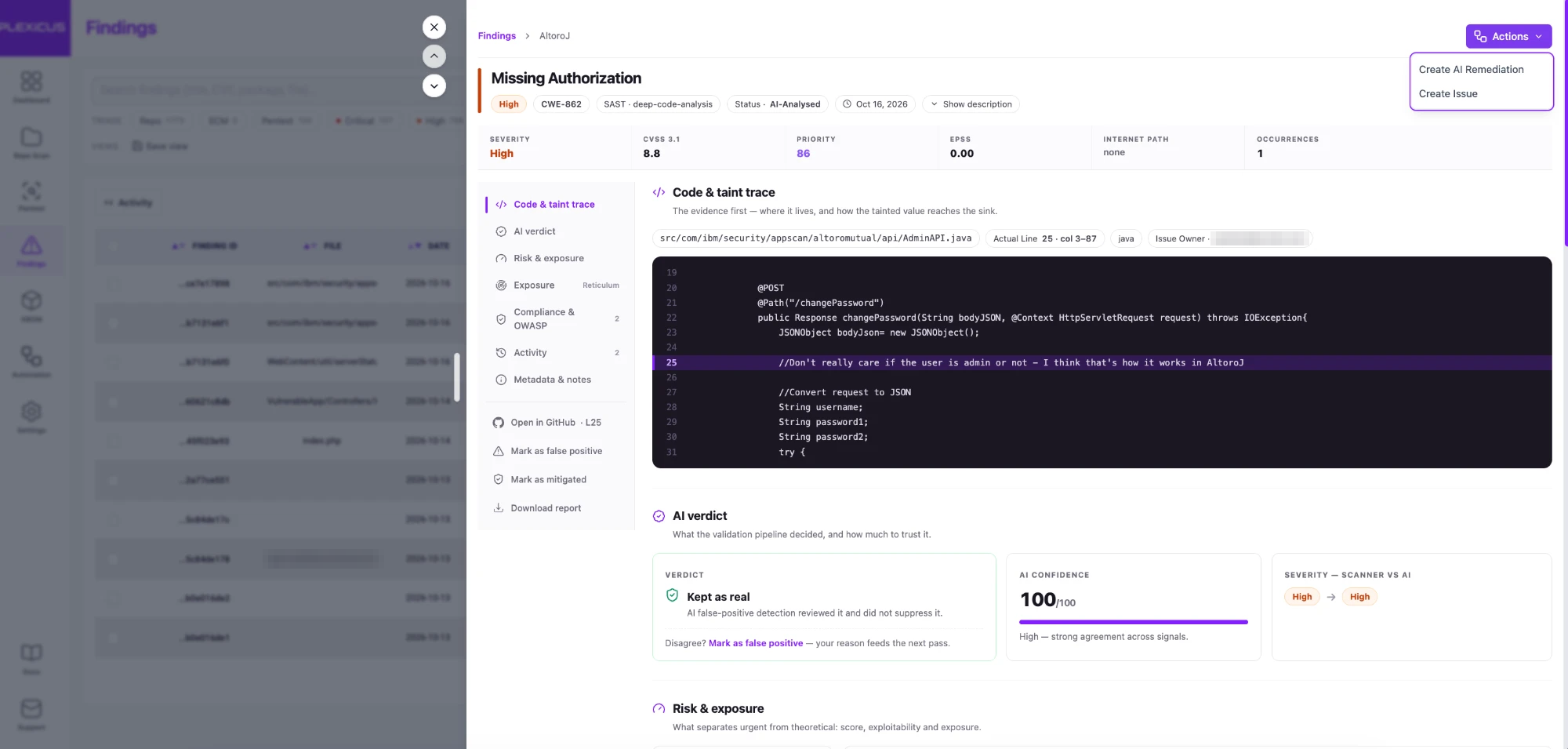
Screenshot: the finding detail view in the Plexicus platform for a Missing Authorization finding (CWE-862) in a demo Java application, with the source label SAST and the Code & taint trace section open on the flagged line. The AI verdict panel and the Actions menu are visible. Demo data, captured October 2026; the issue owner’s email address is pixelated.
6. Triage
A person, or a second automated pass, decides what each finding means.
Is it real, and is it reachable? Does it matter, and who owns the fix?
Triage is where most SAST programs succeed or fail. A tool that produces findings faster than the team can triage them produces a backlog, not security.
Static Analysis Techniques
SAST engines combine some of the techniques below. Each has a different trade-off between speed, precision and depth.
Pattern matching
The engine searches the syntax tree, or sometimes the raw text, for known-bad constructs: a call to a weak cipher, a hard-coded credential, a disabled certificate check.
Strengths: fast, easy to write rules, easy to explain.
Limitations: no understanding of where data comes from, so it flags safe uses and misses unsafe ones that look different.
Data flow and taint analysis
The engine follows values from sources to sinks across the program, as in the Java example above.
Strengths: finds injection flaws with the path that explains them; fewer alerts on code that never sees untrusted input.
Limitations: slower; precision depends on how well the tool models frameworks, libraries and sanitizers; very large programs force approximations.
Semantic and structural models
Some engines build a richer model of the application: its endpoints, parameters, call graph and the roles that can reach each path.
Strengths: can connect a weakness to the endpoint that exposes it and the data behind it, which is what triage needs.
Limitations: harder to build, and still a model. It describes what the code could do, not what an attacker did.
AI-assisted analysis
Newer tools add large language models to explain findings, suggest fixes or filter noise.
Strengths: readable explanations; can reason about code that rules describe poorly.
Limitations: a language model that reads a snippet does not, by itself, establish how a weakness affects the running application. It still needs the structural facts and, ideally, proof.
For a closer look at why bolting a language model onto pattern matching is not enough, see What Is Deep Code Analysis?.
What SAST Finds Well
OWASP lists buffer overflows and SQL injection as examples of well-known vulnerabilities that SAST tools identify, and notes that they scale well: they can run on lots of software and repeatedly, as with nightly builds or continuous integration. OWASP
In practice, SAST is strongest on flaws that are visible in the code itself:
| Weakness | CWE | Why SAST sees it |
|---|---|---|
| Cross-site scripting | CWE-79 | untrusted data flows into an HTML response without encoding |
| SQL injection | CWE-89 | untrusted data flows into a query string |
| OS command injection | CWE-78 | untrusted data flows into a shell call |
| Path traversal | CWE-22 | untrusted data flows into a file path |
| Code injection | CWE-94 | untrusted data flows into an evaluator |
| Out-of-bounds write | CWE-787 | unsafe memory operations in C and C++ |
| Use of hard-coded credentials | CWE-798 | a literal secret appears in the code |
The first six of these weaknesses appear in the 2025 CWE Top 25. MITRE CWE
What SAST Misses
OWASP is direct about the limits. Its list of SAST weaknesses includes: OWASP
- Many vulnerability types are difficult to find automatically, including authentication problems, access control issues and insecure use of cryptography.
- Current tools can automatically identify only a relatively small percentage of application security flaws.
- High numbers of false positives.
- They are frequently unable to find configuration issues, because those are not represented in the code.
- It is difficult to prove that an identified issue is an actual vulnerability.
Those limits line up with the OWASP Top 10
. Its first category is Broken Access Control and its second is Security Misconfiguration: the two kinds of risk static analysis struggles with most.Three more blind spots follow from how SAST works:
Business logic
A static tool does not know that a user should only download their own invoices. If the code checks a session but not ownership, every line looks fine.
Runtime and environment
Headers set by a proxy, a feature flag in production, a permissive cloud setting: none of it is in the repository the tool reads.
Exploitability
A tainted path in the code is a hypothesis. Whether an attacker can reach it from the internet, with what privileges, and what it gives them, is a different question.
SAST answers “where could this go wrong?”. It does not answer “can someone actually do this to us?”.
Why SAST Produces False Positives
A false positive is a finding that is not a real vulnerability.
OWASP explains the root cause: the tool often cannot be sure of the integrity and security of data as it flows through the application from input to output, and it cannot trace data through closed-source components or external systems. OWASP
So the engine has to choose. When it cannot prove a path is safe, it can either stay quiet and risk a false negative, or report and risk a false positive. A security tool that reports in that situation produces exactly the false positives OWASP describes.
Common causes:
- Custom sanitizers the tool does not recognize.
- Framework magic: dependency injection, annotations or ORMs that the tool does not model.
- Dead or test code that never runs in production.
- Missing context: the input is already validated by a gateway the tool cannot see.
What counts as “too many”?
Google published one of the clearest answers. In “Lessons from Building Static Analysis Tools at Google” (Communications of the ACM, 2018), its engineers define an effective false positive as an issue that developers did not take positive action on after seeing it, even if the issue was technically correct.
Their code-review checks must produce less than 10% effective false positives, and if the share of “Not useful” clicks for an analyzer goes above 10%, the team disables that analyzer until its authors improve it. This is Google’s internal practice, reported by its own engineers.
The lesson for any team: developers, not tool authors, decide whether a tool is accurate. A finding nobody acts on costs attention and fixes nothing.
False negatives matter too
A quiet tool is not a safe tool.
A false negative is a real vulnerability the tool missed. Tuning a scanner until it reports nothing uncomfortable is the easiest way to buy a clean dashboard and an unsafe application.
How to Evaluate a SAST Tool
OWASP’s list of selection criteria is a good starting checklist: OWASP
- Support for your programming languages.
- Ability to detect the vulnerabilities you care about, such as the OWASP Top Ten.
- Accuracy: false positive and false negative rates, and the OWASP Benchmark score.
- Understanding of the libraries and frameworks you use.
- Whether it needs buildable source code, and whether it can run against binaries.
- IDE plugins, ease of setup and integration with CI/CD.
- Interoperability of output, for example SARIF.
Use public benchmarks, then your own code
Three public resources help you compare tools on known ground truth:
- OWASP Benchmark. A runnable Java and Python test suite designed to verify the speed and accuracy of vulnerability detection tools, with scorecard generators for common tools. Its intent is that every vulnerability it scores is actually exploitable. OWASP Benchmark
- Juliet test suites. Written by the NSA Center for Assured Software and hosted in NIST’s Software Assurance Reference Dataset. The current Juliet suite for C and C++ alone holds 64,099 test cases organized under 118 CWEs. NIST SARD
- NIST SATE. The Static Analysis Tool Exposition is a recurring, non-competitive study of static analysis tool effectiveness. NIST states that its purpose is not to choose the “best” tool, because tools have different strengths. Six editions have run, the latest reported in September 2019. NIST SATE
Benchmarks are synthetic. The test that matters is your own repository: run each candidate on the same code, then have an engineer triage a sample of findings and count how many lead to a real fix.
For a list of tools to start that comparison, see our roundup of SAST tools for secure development.
SAST Best Practices
1. Start with a small, trusted rule set
Turn on the rules your team will act on: injection, unsafe deserialization, hard-coded secrets, weak cryptography. Expand once the first findings are being fixed.
2. Gate new findings on pull requests, baseline the rest
Developers accept feedback on the code they just wrote. They ignore a pull request comment listing 400 issues from 2019.
So scan every pull request for new findings only, and record the existing ones as a baseline that you work down by risk on its own schedule.
SAST is most useful when it runs where developers already work. A common layout:
IDE            -> instant feedback while typing
Pull request   -> scan only the changed code, comment on the diff
CI pipeline    -> full rule set, block on agreed severities
Scheduled scan -> whole repository, new rules, old code
OWASP notes that tools moving into the IDE give developers immediate feedback on issues they might be introducing, which is very useful compared with finding vulnerabilities much later. OWASP
3. Teach the tool your code
Register your custom sanitizers, validators and framework wrappers. Each one you register removes a whole family of false positives.
4. Track effective false positives
Borrow Google’s idea: measure how often developers act on a finding. A rule nobody acts on needs fixing or removing.
5. Prioritize by reachability and exposure
A SQL injection in an internet-facing endpoint is not the same as one in an internal batch script. Rank findings by what can reach them and what they can reach.
6. Record and triage in the developer’s workflow
That is what NIST asks for in PW.7.2: findings and recommended remediations recorded and triaged in the team’s workflow or issue tracker. A PDF report emailed once a quarter is unlikely to meet it.
7. Validate before you escalate, re-test after the fix
Before a static finding becomes a critical ticket, try to prove it. A reproduced exploit, or at least a confirmed reachable path, changes how fast a team moves.
A fix is not done when the pull request merges. Re-run the analysis, and ideally the proof, to confirm the weakness is gone and the fix did not move it elsewhere.
Common SAST Mistakes
Mistake 1: Treating the finding count as the metric
More findings is not more security. Count fixed, validated issues and time to fix instead.
Mistake 2: Turning on every rule on day one
The result is thousands of findings to triage at once, and a team that learns to ignore the tool.
Mistake 3: Blocking builds on unverified findings
A gate that fails on false positives gets bypassed. Block only on rules with a track record.
Mistake 4: Assuming a clean scan means a secure application
OWASP’s own list says access control and authentication problems are hard for SAST to find automatically, and configuration issues frequently go undetected. A clean SAST report says little about them.
Mistake 5: Leaving the fix to “later”
A finding without an owner and a proposed change is a note, not a security control.
SAST and AI-Generated Code
AI coding assistants change the volume, not the nature, of the problem.
The weaknesses in generated code are the familiar ones: injection, missing authorization, weak cryptography, secrets in code. Veracode’s first report on the topic, a vendor study published in 2025, found cross-site scripting among the most frequent issues in the generated samples it tested. Veracode
What changes is the pace. When a developer accepts a 200-line suggestion in seconds, the review that used to happen while typing does not happen at all.
Three adjustments help:
- Scan where the code is accepted. IDE and pull request scans matter more when code arrives in large blocks.
- Do not let the assistant grade its own work. The tool that wrote the code is not an independent check on it.
- Keep proof in the loop. Generated code that “looks right” deserves the same validation as any other code.
Standards and Frameworks That Call for Code Analysis
NIST SSDF (SP 800-218)
The current final edition was published in February 2022. Practice PW.7 covers reviewing or analyzing human-readable code, and task PW.7.2 asks for findings to be recorded and triaged. NIST
NIST published a draft revision, SP 800-218 Rev. 1, on December 17, 2025; its comment period closed on January 30, 2026, and it remains a draft. NIST
OWASP Top 10
The current edition of the OWASP awareness list. Injection is A05; Broken Access Control is A01. SAST covers part of the list well and part of it poorly, as shown above. OWASP
CWE Top 25 (2025)
MITRE’s ranking of the most dangerous software weaknesses. CWE identifiers give tools a common language: a finding mapped to CWE-89 means SQL injection in any tool. MITRE CWE
OWASP ASVS
The Application Security Verification Standard, whose latest stable version is 5.0.0, lists detailed security verification requirements. Some can be checked by reading code; others need testing or review. OWASP ASVS
SARIF
The OASIS standard format for static analysis results. It lets you swap or combine scanners without rebuilding your reporting. Version 2.1.0 is the approved standard; a committee draft of the next version was published in October 2026. OASIS
From SAST Finding to Proof
Here is the honest summary of SAST.
It is the best tool you have for reading every line of your code, every day.
It is also, by OWASP’s own account, a tool that finds only a relatively small share of security flaws automatically, produces false positives and has difficulty proving that what it found is exploitable.
A penetration test sits at the other end: it tries to exploit the running system the way an attacker would.
Where SAST says “this code path might allow SQL injection”, a pentest says “we extracted these records through this request”. That is the difference between a hypothesis and proof.
So the question is not “SAST or something else”. It is what happens after the finding:
Static finding    -> "this code path might be vulnerable"
Code context      -> "this is the endpoint, the data and the role behind it"
Validation        -> "here is the evidence that it can be exploited"
Reviewed fix      -> "here is the change, with the reasoning and a test"
Re-test           -> "the proof no longer reproduces"
That chain is what we call Proof-Driven AppSec. Its rule is short: no PoC, no finding.
A static alert is where the work starts. Evidence is what makes a team move.
Where Plexicus Fits
Plexicus treats SAST as the first signal, then adds the context, the proof and the fix.
Start with a scan. The free SAST tool scans your GitHub source code with read-only access. Plexicus states that it stores no code and does not use it for AI training.
The report lists the detected vulnerabilities with a severity breakdown, CVE references and CVSS scoring. The free scan connects to GitHub today; GitLab and Bitbucket are listed as coming soon.
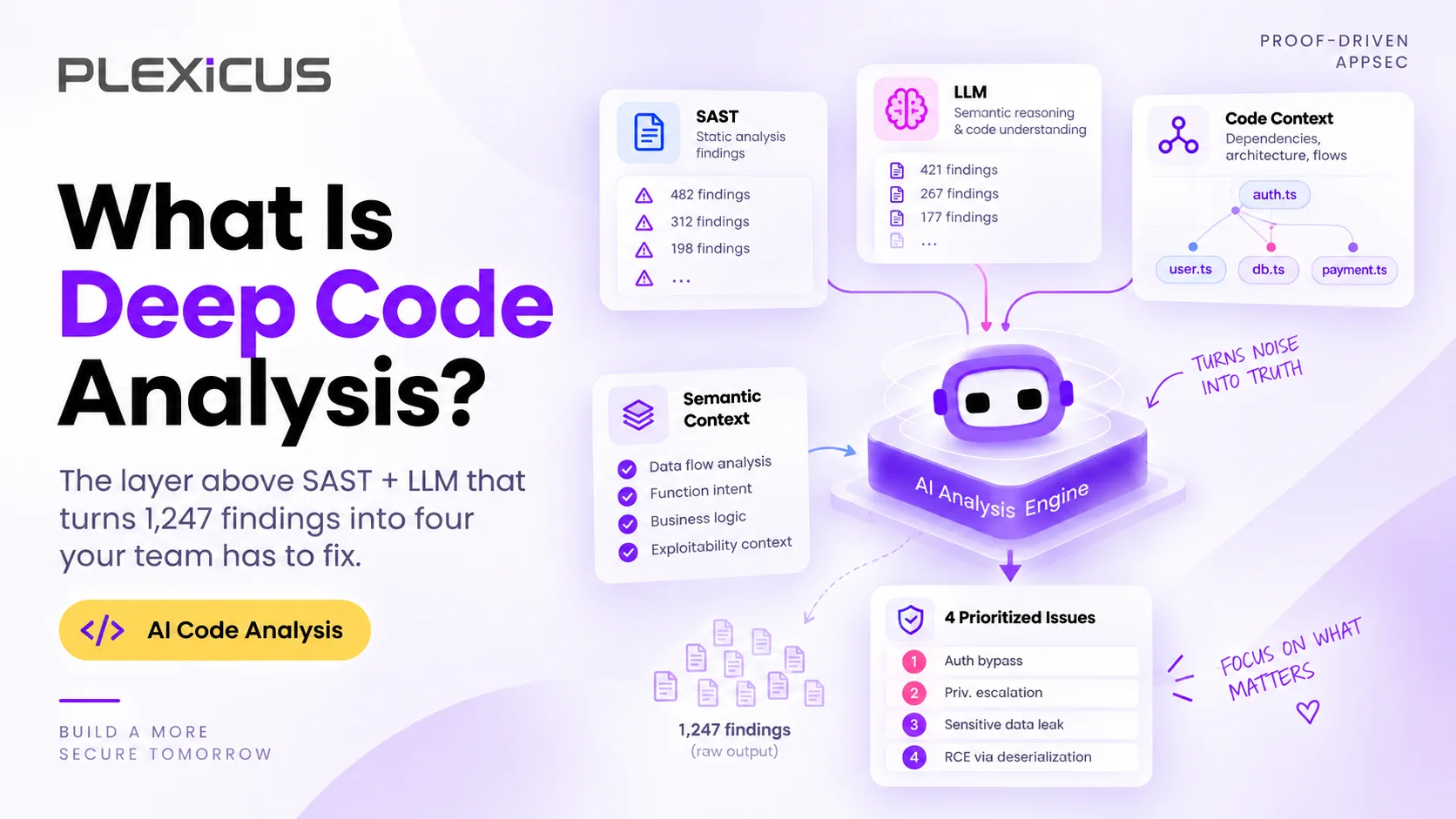
Add context. Deep Code Analysis connects code, data flow and business impact. Its product page puts the difference plainly: SAST can flag a pattern and a language model can explain code, but neither establishes how a weakness affects the application.
Deep Code Analysis traces the affected code path, so engineers see the endpoints, parameters and business logic a finding touches, binds each finding to the data it can reach and the role that can trigger it, and maps the weakness class to CWE. The page lists 12 languages: JavaScript, TypeScript, Python, Go, Java, Rust, Ruby, PHP, C#, Swift, Kotlin and Scala.
Prove it. Deep Code Analysis adds the context and AI Swarm Pentest validates the highest-priority findings. AI Swarm Pentest validates exploitable paths across your application, API and source code within an authorized scope, with independent verification and no automatic production changes. Our introduction to AI Swarm Pentest explains how the swarm of agents works.
Fix it. Once a finding is verified, Plexicus Remediation prepares the remediation context and a suggested change. For classic SAST findings such as SQL injection, XSS, SSRF, insecure deserialization and weak cryptography, Plexicus prepares reviewed patches with regression tests attached where relevant, and a re-test hook is wired to CI. Your team keeps merge control: Plexicus never pushes to production.
This is how a static SQL injection finding looks once a fix has been proposed:
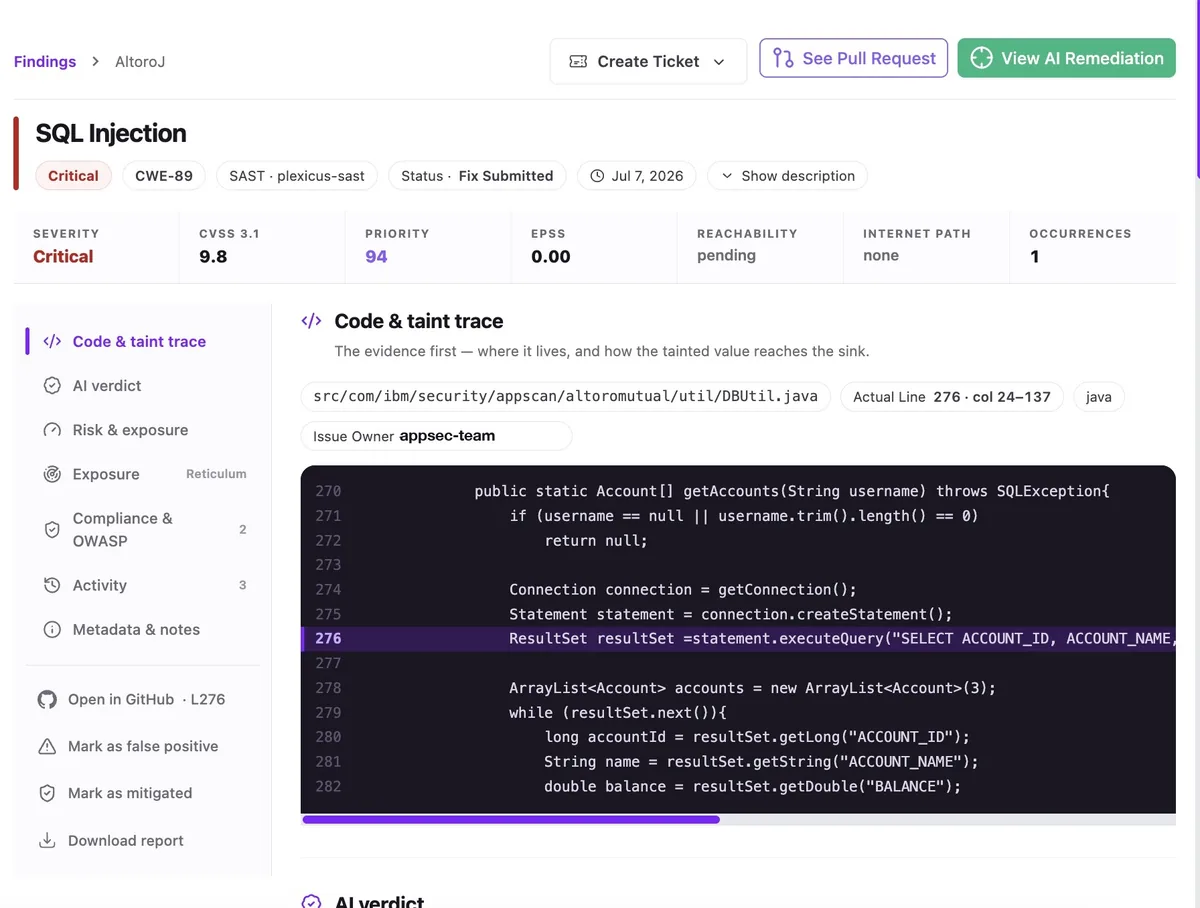
Screenshot: a critical SQL injection finding (CWE-89) in a demo Java application, with the source label SAST and the status Fix Submitted, shown in the Plexicus platform. The toolbar offers Create Ticket, See Pull Request and View AI Remediation. Demo data from an earlier version of the Plexicus interface, July 2026.
Put together, that is a closed loop with PR: a static signal, context, evidence for what matters, then a reviewed change your team decides to merge.
To see where SAST sits in a full program, read our complete guide to application security. For what happens after validation, see Introducing AI-Native Remediation.
Frequently Asked Questions
What does SAST stand for?
SAST stands for static application security testing: analyzing an application’s code for security weaknesses without running it.
What is the difference between SAST and DAST?
SAST reads the code from the inside without running it. DAST tests a running application from the outside by sending requests. SAST pinpoints the line; DAST shows real runtime behavior.
What is the difference between SAST and SCA?
SAST analyzes the code your team wrote. SCA inventories third-party and open-source components and matches their versions against known vulnerabilities.
What vulnerabilities can SAST find?
SAST is strongest on flaws visible in code: SQL injection, cross-site scripting, command injection, path traversal, code injection, unsafe memory operations and hard-coded credentials.
What can SAST not find?
According to OWASP, SAST struggles with authentication problems, access control issues, insecure use of cryptography and configuration issues, and it has difficulty proving that a finding is exploitable. Business logic flaws are also largely invisible to it.
Why does SAST produce so many false positives?
When a tool cannot prove that data is safe as it moves from input to output, it usually reports it. Custom sanitizers, frameworks the tool does not model and missing runtime context are the most common causes.
How do you reduce SAST false positives?
Start with a small rule set, register your sanitizers and framework wrappers, scan only new code on pull requests, track how often developers act on findings, and validate high-severity findings before escalating them.
Is SAST required for compliance?
Frameworks such as the NIST SSDF ask for code review or code analysis, with findings recorded and triaged, but they do not name a specific tool. SAST is a common way to meet the code analysis part at scale.
Is SAST enough on its own?
No. SAST is one layer. A program also needs SCA for dependencies, runtime testing, and a way to prove which findings are exploitable before the team spends time fixing them.
Make Every Static Finding Prove Itself
Read every line with SAST, then spend your team’s time only on what can be proven.
Explore Plexicus Deep Code Analysis →
Want a first look at your own code? Run the free SAST tool, a static scan of your GitHub source code.